
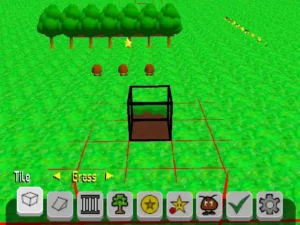
Play Mario Builder 64 online! It is one of the top-rated Nintendo 64 games you can play for free. No download, emulator, or setup required—jump straight into the action directly in your browser and start playing this classic in seconds.
What if you could build your own Super Mario 64 levels — right inside the game itself, on original Nintendo 64 hardware — and then share them with the entire world? That is exactly what Mario Builder 64 makes possible. Released in May 2024 and massively updated in June 2025 with version 1.1, Mario Builder 64 is the closest thing the Nintendo 64 has ever had to a true Mario Maker 3D experience. For millions of fans who grew up with Super Mario 64 and dreamed of crafting their own courses, Mario Builder 64 is nothing short of a dream come true.
This comprehensive guide covers everything you need to know: what Mario Builder 64 is, how it compares to Super Mario Maker, how to install and play it on PC, what version 1.1 adds, how the community sharing system works, and much more. Whether you’re searching for a super mario builder experience on the N64 engine, looking to play mario 64 pc style with custom levels, or just curious about what mario maker 64 fans have been talking about — this is your definitive resource.
What Is Mario Builder 64?
Mario Builder 64 (commonly abbreviated MB64) is a Super Mario 64 ROM hack developed by two community modders known as Rovertronic and Arthurtilly. Rather than replacing the original game’s levels with new handcrafted worlds — as most SM64 ROM hacks do — Mario Builder 64 transforms the entire game into a sandbox-style level creation toolkit. It is, in the most direct sense, a Mario Maker 3D built for the Nintendo 64.
The project was first released on May 18, 2024, and was immediately celebrated across the ROM hacking community, gaming media, and social platforms. Its most recent major version, v1.1, was released on June 15, 2025, and brought sweeping improvements to the editor, new tools for creators, expanded object limits, and quality-of-life upgrades that made Mario Builder 64 the most accessible super mario builder experience on any N64-based platform.
Unlike PC-based Super Mario 64 level editors that require modelling software, file converters, and technical knowledge, Mario Builder 64 is an entirely in-game experience. Everything — designing terrain, placing enemies, setting star conditions, choosing a music track, and even saving your finished level — happens inside the game. It runs on real Nintendo 64 hardware as well as emulators, making it one of the most technically impressive mario maker 64-style projects ever created.
Why Mario Builder 64 Is a Historic Achievement
To understand why Mario Builder 64 matters so much, consider the context. Super Mario 64 was released in 1996 and revolutionized 3D platforming. For nearly three decades, the only way to create new levels for it was through PC-side tools like Toad’s Tool 64 and Quad64 — applications that required importing 3D models, understanding collision meshes, and considerable technical skill. The barrier to entry was high, and the audience was limited to dedicated modders.
Nintendo’s own Super Mario Maker series gave players the ability to create 2D Mario courses, first on Wii U, then on Switch — but it never ventured into 3D territory. The idea of a true Mario Maker 3D, a creation tool built around the physics and feel of Super Mario 64, remained a fantasy for decades. Mario Builder 64 finally makes that fantasy real — and it does so natively on the original game engine, respecting every quirk and nuance of the original Super Mario 64 movement system that millions of fans know by heart.
Core Features of Mario Builder 64
Mario Builder 64 packs a remarkable amount of functionality into a Nintendo 64 ROM. Here is a detailed breakdown of what the game offers:
The In-Game Level Editor
The heart of Mario Builder 64 is its intuitive, grid-based level editor. When you launch the game, you are placed directly into a creation environment where you can begin laying out your course tile by tile. The editor presents a 3D grid canvas, and you populate it by selecting from a library of over 100 different parts.
The original v1.0 release already included an impressive selection of building components. According to community documentation, the editor in the base version contained:
- 12 block types for building terrain and platforms
- 7 collectable objects including coins, red coins, and Power Stars
- 16 environment objects such as switches, moving platforms, and obstacles
- 34 enemy and boss types drawn from the original Super Mario 64 roster
- 1 NPC — the classic running Koopa from the game’s slide courses
Everything fits together on the grid naturally. Block tiles automatically adapt their textures at edges to produce smooth, organic-looking terrain. Grass, snow, cave walls, and other surface types all blend correctly when placed adjacent to each other, giving even a beginner’s first level a polished, coherent appearance.
Level Themes and Visual Customization
One of the most celebrated aspects of Mario Builder 64 is its extensive theme system. Rather than being locked to a single look, creators can apply different visual environments to their levels, changing the skybox, surface textures, background scenery, and lighting atmosphere. Available themes include environments inspired by iconic Super Mario 64 worlds:
- Grassy plains (Bob-omb Battlefield style)
- Snow and ice environments
- Cave and underground settings (Hazy Maze Cave aesthetic)
- Lava and castle interior themes
- Desert and sand-based environments
- Underwater and aquatic levels
- Sky and cloud-based stages
- Ghost house and haunted aesthetics
Each theme brings a different mood to a level and pairs with different music selections. Mario Builder 64 includes a wide selection of music tracks that creators can assign to their courses — from classic Super Mario 64 compositions to additional tracks that expand the sonic palette of the original game.
Cursed Mirror Mode
Mario Builder 64 also includes a special content tier called Cursed Mirror Mode. When enabled, this mode unlocks additional objects, enemies, and environmental elements that go beyond the base game’s curated selection. Cursed Mirror Mode is aimed at experienced creators who want even more tools to build elaborate, unusual, or high-difficulty levels — including objects and behaviors not present in standard mode. It is essentially an advanced layer for veteran builders who have outgrown the base palette.
Star Conditions and Gameplay Systems
Collecting Power Stars is the core objective of Super Mario 64, and Mario Builder 64 gives creators full control over how stars are earned in their levels. Creators can place stars as direct collectables, hide them inside breakable objects, set them as rewards for defeating specific enemies, or trigger them through environmental puzzle conditions. The game’s interaction system is flexible enough to support everything from straightforward platforming courses to elaborate contraptions with multi-step puzzles.
Version 1.1 — What’s New in the 2025 Update
On June 15, 2025, Arthurtilly announced via social media that Mario Builder 64 version 1.1 had launched, describing it as a massive update with a huge number of new features, quality-of-life improvements, and polish. The announcement accumulated over 266,000 views, reflecting the scale of community enthusiasm for the project. Here is a detailed look at what version 1.1 brings:
Expanded Object and Tile Limits
Arguably the most impactful change in Mario Builder 64 v1.1 is the dramatically expanded object and tile limit. In the original release, creators sometimes found themselves running up against a ceiling on how complex or large their levels could be. Version 1.1 lifts this ceiling significantly, meaning designers can now build bigger, denser, and more elaborate courses than ever before. For experienced creators who had been feeling constrained, this single change opens up an entirely new level of creative freedom.
On/Off Conveyor Belts
Version 1.1 adds togglable on/off conveyor belts as a new environmental mechanic. These objects allow creators to build puzzle rooms and obstacle courses where moving platforms and conveyor systems can be switched on and off — enabling sequences where the player must time their movement carefully or activate switches to change the flow of an area. This mechanic brings Mario Builder 64 much closer to the puzzle variety seen in Nintendo’s own Super Mario Maker series on modern consoles.
New Star Triggers — Imbuing System
The v1.1 update introduces a new imbuing system that dramatically expands how creators can configure star conditions and enemy behaviors. With this system, creators can:
- Hide Power Stars inside breakable blocks, so players must smash through terrain to find collectables
- Set specific enemies to drop particular items when defeated, turning combat into a rewarding element of the course
- Place specific objects inside ! Boxes for surprise reveals that reward exploration and curiosity
This system transforms how stars function within a level and gives Mario Builder 64 a storytelling quality — creators can craft a journey where discovering a star feels earned rather than simply handed to the player.
Numerous Quality-of-Life Improvements
Beyond the headline features, version 1.1 includes a comprehensive set of smaller improvements to the editor interface, level navigation, save/load stability, and overall game performance. These cumulative refinements make the building and playing experience noticeably smoother and more reliable for both new users and veterans.
Mario Builder 64 vs. Super Mario Maker — How Do They Compare?
It is natural to compare Mario Builder 64 to Nintendo’s official Super Mario Maker and Super Mario Maker 2. Both are level creation tools built around Mario’s core mechanics. But they serve fundamentally different purposes and audiences.
The 2D vs. 3D Distinction
Nintendo’s Super Mario Maker games are built around 2D Mario gameplay — the side-scrolling style of Super Mario Bros, Super Mario Bros 3, Super Mario World, and New Super Mario Bros U. Super Mario Maker 2 also added a 3D World style, but even that was a perspective-shifted, pseudo-3D experience. A true Mario Maker 3D — a creation tool built around full 3D freedom of movement in a three-dimensional world — has never been made by Nintendo.
Mario Builder 64 fills this gap. It is a genuine mario maker 64 experience: real 3D space, authentic Super Mario 64 physics, and the freedom to build in all three dimensions. In this sense, it is not merely a competitor to Super Mario Maker — it is something entirely different that Nintendo has never offered.
Accessibility
Nintendo’s Super Mario Maker was designed for the broadest possible audience and features a polished, icon-driven UI designed for touchscreen use. Mario Builder 64 is somewhat more involved to set up, requiring ROM patching and emulator configuration. However, once running, the in-game editor is genuinely accessible — the developers have repeatedly emphasized that the learning curve is gentle, while advanced features offer meaningful depth for committed designers.
Community and Sharing
Super Mario Maker featured Nintendo’s own integrated course-sharing system, which was shut down for Wii U in 2021. Mario Builder 64 relies on the community-run Level Share Square platform, where creators can upload their .mb64 files and players can download and load them directly into their game. This community-driven approach has produced thousands of levels spanning every imaginable style and difficulty level.
How to Play Mario Builder 64 on PC
Playing Mario Builder 64 on PC — or mario 64 pc style via emulation — is straightforward once you know the steps. Here is a complete walkthrough:
Step 1 — Obtain the BPS Patch File
Mario Builder 64 is distributed as a BPS patch file, not a standalone ROM. You must obtain this patch from an official source such as GameBanana, romhacking.com, or the N64 Squid download page (password: mariomaker64). The patch file is legally distributable because it does not contain any of Nintendo’s original game data.
Step 2 — Obtain a Compatible Super Mario 64 ROM
You need a legally acquired copy of the original Super Mario 64 ROM. The required file is Super Mario 64 (U) [!].z64 — the North American version. Only this exact version will patch correctly.
Step 3 — Apply the Patch
Use the Flips patching tool to apply the BPS file to your ROM. Drag and drop your Super Mario 64 ROM onto Flips, select the BPS patch file, choose an output location, and Flips will generate your Mario Builder 64 ROM. Alternatively, the online patcher at romhacking.com can perform this step in your browser without any additional software.
Step 4 — Set Up an Emulator
The recommended way to run Mario Builder 64 on PC is via Parallel Launcher, a free, open-source emulator front-end based on the ParallelN64 RetroArch core. Parallel Launcher is available for Windows, macOS, and Linux, and is widely considered the most reliable option for playing Super Mario 64 ROM hacks. It also supports a virtual SD card, which is essential for saving and loading levels in Mario Builder 64.
Alternatively, Project64 and other N64 emulators can run Mario Builder 64, though Parallel Launcher is strongly preferred by the community for its stability and SD card emulation support.
Step 5 — Configure SD Card Emulation
Mario Builder 64 saves and loads levels through an SD card interface. On real Nintendo 64 hardware, an EverDrive flash cartridge provides this SD card. On PC, Parallel Launcher emulates this with a virtual SD card directory. You must configure this in Parallel Launcher’s settings before attempting to save or load custom levels, otherwise the save system will not function correctly.
Step 6 — Download and Play Community Levels
Once your setup is running, visit Level Share Square (levelsharesquare.com) to browse thousands of community-created Mario Builder 64 levels. Download any level file, place it in your virtual SD card directory, and load it from within the game. You are now playing the closest thing to a true mario maker 64 experience that exists on the N64 platform.
Playing Mario Builder 64 on Real Nintendo 64 Hardware
One of the most remarkable aspects of Mario Builder 64 is that it runs on the original Nintendo 64 console — not just on emulators. To play it on real hardware, you need an EverDrive 64 or compatible N64 flash cartridge. Load the patched ROM onto your EverDrive’s SD card. For EverDrive users, you must also add the following line to the save_db.txt configuration file: 0xFD30499C=3 (Mario Builder 64). This tells the EverDrive to allocate the correct save type for the game.
Once configured, the game’s level saving and loading system writes directly to the EverDrive’s SD card, meaning the experience on real hardware is functionally identical to playing on an emulator. You can transfer level files between your PC and SD card to share creations between the real console and emulation environments.
The Mario Builder 64 Community — Level Share Square and Beyond
The community that has formed around Mario Builder 64 is one of the most active and creative spaces in the modern Nintendo 64 hobbyist scene. At its center is Level Share Square, a dedicated platform for sharing, rating, and discovering Mario Builder 64 courses. Since launch, thousands of levels have been uploaded — ranging from gentle introductory courses to brutal kaizo platforming challenges, from nostalgic recreations of classic Super Mario 64 stages to completely original worlds that have never been seen before.
The variety of what creators have built with Mario Builder 64 is staggering. The community has produced:
- Retro throwback levels that recreate the feel of classic Nintendo worlds in 3D
- Kaizo courses with precise jumps and technical platforming challenges designed to test the best speedrunners
- 8-star campaigns that function as full mini-games with coherent progression
- Experimental contraptions that push the interaction system to its limits — including functional calculators built entirely within the editor
- Puzzle levels that use switches, conveyors, and star conditions to create multi-step environmental challenges
- Speedrun stages optimized for competitive time-attack play
The Mario Builder 64 community communicates primarily through Discord servers dedicated to the game, where builders share work-in-progress levels, seek feedback, organize community events, and collaborate on large-scale projects. The wiki maintained on Level Share Square documents the game’s mechanics, setup procedures, and community guidelines in detail, making it easy for new players to get started.
Mario Builder 64 as a Super Mario Builder — Technical Innovation
From a technical standpoint, Mario Builder 64 represents an extraordinary achievement in Nintendo 64 development. Rovertronic and Arthurtilly built a fully functional, real-time 3D level editor on hardware from 1996 — hardware with 4 megabytes of RAM and a 93.75 MHz processor. Every element of the editor, from the camera controls and placement UI to the file save/load system and SD card interface, had to be engineered from scratch within the constraints of the N64 architecture.
The game uses the SM64 engine’s existing physics and collision systems as its foundation, which is why player movement in custom levels feels exactly like the original Super Mario 64 — because it is the original engine, untouched. Creators are essentially furnishing a space that runs on the same code that launched the 3D platformer genre in 1996. This fidelity to the original feel is a major reason why the Mario Builder 64 community has embraced the project so enthusiastically.
The SD card level system is particularly innovative. Most Super Mario 64 ROM hacks store their levels in the ROM itself, which limits how much content can be included. Mario Builder 64 sidesteps this entirely by reading level data from external storage at runtime — meaning the game’s content capacity is limited only by the size of your SD card, not by the ROM’s fixed memory space. This is what makes the level sharing ecosystem possible.
How Mario Builder 64 Compares to Other Super Mario 64 ROM Hacks
The Super Mario 64 ROM hacking scene is massive and has produced thousands of projects over the past two decades. Fan-made games like Super Mario Star Road, Super Mario 74, Tiny-Huge Odyssey, and countless others have delighted fans with new campaigns built on the SM64 engine. These are traditional ROM hacks: fixed experiences designed by a creator and played by everyone else.
Mario Builder 64 occupies a completely different category. It is not a game — it is a platform. Rather than offering a single curated adventure, it empowers every player to become a creator. In this sense, Mario Builder 64 has more in common with game engines and game-creation tools than it does with other SM64 hacks. Its closest philosophical parallel is Nintendo’s Super Mario Maker, even though the technical implementation is entirely different.
The result is a project with effectively infinite content. As long as the community continues to create and share levels, Mario Builder 64 will never run dry. There is always something new to play, always a new challenge to attempt, and always room for a new creator to contribute their vision to the growing library.
Why Mario Builder 64 Matters for Super Mario 64 Fans
Super Mario 64 is one of the most beloved video games ever created. Its influence on game design, movement systems, and the concept of 3D play cannot be overstated. For fans who have spent decades with the game — memorizing every level, perfecting every movement technique, and dreaming of what more courses in this engine could feel like — Mario Builder 64 is a profoundly meaningful release.
It answers a question that has quietly persisted since 1996: what would a Mario Maker 3D look like if it were built in the world of Super Mario 64? The answer, it turns out, is something remarkable — accessible enough for beginners, deep enough for veterans, technically impressive enough to draw coverage from major gaming outlets, and community-driven enough to sustain years of ongoing content creation.
Whether you want to play super mario levels created by talented builders worldwide, design your own courses to challenge your friends, or simply experience something new in an engine you’ve loved for decades, Mario Builder 64 delivers on all fronts.
Frequently Asked Questions About Mario Builder 64
What exactly is Mario Builder 64?
Mario Builder 64 is a ROM hack of Super Mario 64 for the Nintendo 64, developed by Rovertronic and Arthurtilly. It transforms the original game into a fully functional 3D level editor — a mario maker 64 style creation tool — where players can build, save, and share their own custom courses. It is the closest thing to a true Mario Maker 3D experience that has ever been made for the Super Mario 64 engine.
Is Mario Builder 64 free to download?
Yes. Mario Builder 64 is distributed freely as an open-source BPS patch file. It is available on GameBanana, romhacking.com, and N64 Squid, among other community sites. The patch itself contains no Nintendo-owned game data, so it is legally distributable. You do need to supply your own legally owned Super Mario 64 ROM to apply the patch.
Can I play Mario Builder 64 on PC?
Absolutely. Mario Builder 64 plays on any accurate N64 emulator. The recommended setup for playing on PC is Parallel Launcher, a free emulator front-end available for Windows, macOS, and Linux. Parallel Launcher supports virtual SD card emulation, which is required for saving and loading custom levels in Mario Builder 64. This is the most popular way to experience mario 64 pc-style with custom levels.
Does Mario Builder 64 run on a real Nintendo 64?
Yes. Mario Builder 64 was designed to run on original Nintendo 64 hardware. To play it on a real console, you need an EverDrive 64 or compatible N64 flash cartridge. You must also configure your EverDrive’s save_db.txt file with the correct entry for Mario Builder 64 to ensure the save system functions correctly. The level system reads from and writes to the SD card inside your flash cartridge, just as the emulator reads from a virtual SD card.
What is Level Share Square?
Level Share Square (levelsharesquare.com) is the official community hub for sharing Mario Builder 64 levels. It is a website where creators can upload their finished .mb64 level files, and where players can browse, download, and rate community-created courses. It hosts thousands of levels covering every difficulty and style. The site also maintains a wiki with a comprehensive setup guide for new players.
How is Mario Builder 64 different from Super Mario Maker?
Nintendo’s Super Mario Maker series is a 2D level creation tool built around side-scrolling Mario gameplay. Mario Builder 64 is a 3D level creation tool built around the full three-dimensional gameplay of Super Mario 64. There is no official Nintendo product that offers a true mario maker 3d experience — Mario Builder 64 is the first and only project to deliver that concept, and it does so as a fan-made ROM hack running on original Nintendo 64 hardware.
What’s new in Mario Builder 64 version 1.1?
Released on June 15, 2025, version 1.1 of Mario Builder 64 introduced a significantly expanded object and tile limit (allowing bigger and more complex levels), on/off conveyor belt mechanics for puzzle design, a new imbuing system for customizing star triggers and enemy behaviors (including hiding stars in breakable blocks and setting enemies to drop specific items), and a wide range of quality-of-life improvements throughout the editor and game systems.
Who made Mario Builder 64?
Mario Builder 64 was created by two independent Nintendo 64 modders: Rovertronic and Arthurtilly. The project is open-source and hosted on GitHub, where community contributors have also helped improve and expand the game over time. It is a fan project with no affiliation with Nintendo.
Is Mario Builder 64 related to Super Mario 64 PC port?
No. Mario Builder 64 is a ROM hack of the original Nintendo 64 game, not a modification of the mario 64 pc decompilation port. It runs on emulators and real N64 hardware through standard ROM patching. The Super Mario 64 PC port is a separate fan project based on a decompilation of the original code. Both exist in the same community ecosystem, but are technically distinct projects.
How many levels are available in Mario Builder 64?
Mario Builder 64 does not come with pre-built levels — it is a creation tool. The number of playable levels grows continuously as the community creates and shares them on Level Share Square and other platforms. Since launch, thousands of community levels have been created and shared, and new ones are added regularly. This makes Mario Builder 64 effectively an infinite content experience, unlike a traditional game with a fixed level count.
Conclusion — Mario Builder 64 Is the Super Mario Builder Fans Always Deserved
Mario Builder 64 is more than a ROM hack. It is a milestone in fan-made game development, a love letter to Super Mario 64, and a genuine creative platform that has empowered thousands of players to become level designers for the first time. In doing so, it has created something Nintendo never offered: a true mario maker 3d experience rooted in the physics, aesthetics, and feel of the most iconic 3D platformer ever made.
Whether you are looking for a super mario builder tool to express your own creativity, searching for an endless supply of new super mario 64 courses to challenge yourself, or simply curious about what the community has been able to build on a 1996 game console, Mario Builder 64 deserves your attention. Set it up, load a few community levels, and then start placing your own blocks — because the canvas is waiting, and the only limit is your imagination.




Admin can you make it for mobile and make it load too please
wont let me use arrow keys or do anything 😭😭😭😭
try in chrome please, shift for insert coin, enter for start game
use the T,H,F,G buttions to use the tools. anonmuos…
it’s awsome and useful, please add other stuff